
All-day events
All-day events are usually reminders, not commitments: birthdays, public holidays, “trade fair week”, “Peter working from home”. If they were transferred as busy, the whole day in the target calendar would be blocked — and nobody could book you although you’re free.
Default: treat as free
Section titled “Default: treat as free”That’s why all-day events are transferred as free by default: they appear in the target but don’t block any time. A public-holiday calendar as a source stays completely harmless this way.
Alternative: block the whole day
Section titled “Alternative: block the whole day”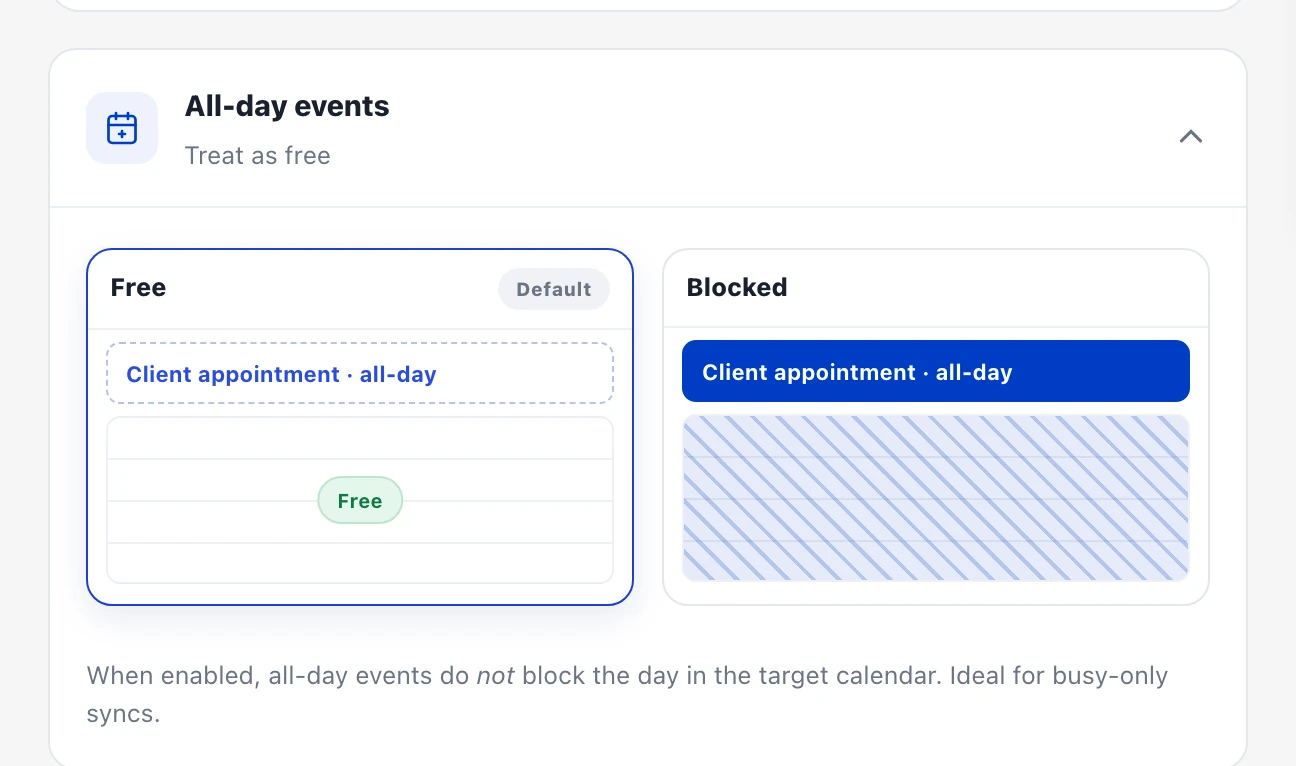
If an all-day event really should block (e.g. vacation), you have two options:
- Per sync: when creating, in the “Visibility” step, expand the “All-day events” card and pick “Blocked” instead of “Free” (default). This then applies to all all-day events of that sync; with a two-way sync it can also be set per direction.
- Per event: create the vacation as a regular timed event (e.g. 8am–6pm) — that’s always transferred as busy, regardless of the option.
Tip: if only individual all-day events should block, option 2 is usually better — otherwise all birthdays suddenly block too.
Changing it later
Section titled “Changing it later”The option can be changed at any time: in the dashboard via the sharing’s three-dot menu → “Edit” → “Advanced settings”. The existing copies in the target calendar are adjusted automatically → Edit a sharing.